Skip to content
Todd Brannon

The answers are already in your business. They're scattered across spreadsheets, systems, and people's heads.

I build the systems that bring them together: profitability software for DME suppliers, modernized spreadsheets and custom applications for operators, and AI Business Workspaces built around how your company actually works.

  • AI Business Workspaces

    For owner-led companies whose knowledge is scattered and whose team starts every ChatGPT or Claude session from a blank prompt.

    See what gets built

  • Spreadsheet and systems modernization

    For operators running part of the business on a file only one person understands. Audit, stabilize, automate, or rebuild into software.

    See how it works

  • DME Delivery & Profitability software

    For DME and HME suppliers who can see what they billed and collected but not what any order, payer, or serialized unit actually earned.

    See the software

AI Business Workspaces

Turn the knowledge scattered across your business into an AI workspace your team can actually use.

I don't teach companies how to prompt. I build an AI operating environment around how the business actually works.

Most companies use ChatGPT or Claude one conversation at a time. Someone opens a blank prompt, explains the company again, and gets an answer that doesn't know how the business operates. The problem isn't access to AI. It's that the context the AI needs is spread across Google Drive, Microsoft 365, spreadsheets, email, PDFs, and the owner's head.

An AI Business Workspace organizes what the company already knows, its documents, spreadsheets, SOPs, pricing rules, customer information, project context, and decision rules, into a structured, client-owned environment in ChatGPT, Claude, or another platform, so the team isn't starting from zero every time.

Before and after

Before and after
BeforeAfter
Scattered files and tribal knowledgeStructured company knowledge with a clear source hierarchy
Blank-prompt AI useWorkspaces that already know the business
Explaining the company again every sessionPersistent instructions and reusable context
Disconnected tasksRepeatable AI-assisted workflows
The owner as the knowledge bottleneckInstitutional knowledge the team can reach, with controls
AI as a writing toyAI as a practical operating layer

What gets built

  • A business knowledge layer: context, terminology, products, customers, policies, roles, constraints, past decisions
  • A knowledge architecture: what belongs in canonical documents, project files, databases, instructions, and dashboards
  • Purpose-built workspaces for leadership, sales, operations, accounts, finance, or projects
  • Persistent AI instructions for sources, conflicts, uncertainty, policy, tone, and recurring tasks
  • Repeatable workflows for research, meetings, proposals, briefings, triage, analysis, reporting
  • Governance and a maintenance model: source authority, access, sensitive information, human review, ownership

A walkthrough of a fictional company, before and after, is in production and will appear here.

How it works

  1. Discovery

    Interviews with leadership and key people, and an inventory of tools, information, recurring work, business rules, decisions, and bottlenecks.

  2. Knowledge extraction

    Collecting and reviewing the documents, spreadsheets, SOPs, notes, email knowledge, and project records that matter, and what people know but haven't written down.

  3. Architecture

    Deciding the source hierarchy, the workspaces, the canonical knowledge, the instructions, and where workflows will help.

  4. Build

    Configuring your AI environment and loading the approved knowledge structure.

  5. Workflow implementation

    A focused set of recurring workflows, built on your team's actual work.

  6. Activation

    Training people by running the new system on real business tasks, not through general AI lectures.

  7. Handoff and governance

    Documenting ownership, source authority, maintenance, permissions, and where a person reviews the output.

After handoff, optimization is ongoing: keeping knowledge current, improving instructions, adding workflows, and adapting the workspace as the business changes.

You own the result

The production workspace is yours: your company data, your documents, and your configured environment in ChatGPT, Claude, or whatever platform you choose. I'm invited in to build it, and when the engagement ends you keep everything that was built. What I keep is the method I bring to the next client. You're not locked in to me, and you're not locked in to one vendor's interface, because the system sits above the platform layer and moves with you.

You own

  • Your files, data, and proprietary information
  • Company-specific documentation and generated knowledge
  • The configured operating environment
  • Your internal processes and decision rules

I keep

  • The discovery method
  • Architecture frameworks and knowledge schemas
  • Instruction frameworks and templates
  • Workflow-design methods and reusable components

Who it's for

  • Owner-led or operationally complex companies, roughly 10 to 150 people
  • Heavy users of Excel, Sheets, Docs, PDFs, email, and disconnected SaaS tools
  • Teams that have tried ChatGPT or Claude but use it for isolated tasks

You'll recognize this if

  • “Everything is in my head.”
  • “We have several versions of the same spreadsheet.”
  • “We tried ChatGPT, but everybody uses it differently.”
  • “Our SOPs exist, but no one really uses them.”

How it connects to the rest of the work

Spreadsheet modernization takes a legacy spreadsheet to business rules, a data model, and an application. AI Workspace modernization takes scattered knowledge to structured context, repeatable workflows, and an AI operating environment. Working across both, I can tell you what should stay a document, become structured data, become software, become an AI workflow, or remain a human decision.

Engagement options

  • AI Workspace Audit

    Discovery, current-state assessment of workflows and knowledge, risks, opportunities, recommended architecture

  • AI Business Workspace Buildout

    Knowledge architecture, workspace setup, instructions, workflows, templates, handoff

  • AI Business Command Center

    Deeper implementation with dashboards, integration, automation, cross-functional operating views

  • AI Operations Support

    Knowledge goes stale: people, policies, services, tools, and AI capabilities all change. Ongoing maintenance, workflow expansion, governance, and new use cases.

Twenty minutes. We map your people, knowledge, processes, tools, and repetitive work to where AI can actually help, and you leave with a picture of how your business could be structured.

Spreadsheet and systems modernization

The spreadsheet that runs the business

Most operators have one file that runs part of the business: the estimator, the schedule, the commission sheet, the margin tracker. One person built it, one person understands it, and the questions it can't answer get reconstructed by hand once a quarter or not at all.

The systems I build start by making that file trustworthy: inputs separated from logic, rules protected, a reporting view a second person can read. Then they add the number the file can't produce, margin by payer, by job, by technician, next to the numbers it already has.

  • Which payers still make money after delivery and labor costs?
  • Which referral sources send work that is worth servicing?
  • Which products carry the operation, and which lose money on every delivery?

Three ways in. Every one starts with an audit.

I'll tell you which path fits after looking at the tool you have and the questions you can't answer. Sometimes the right answer is a better spreadsheet.

Stabilize the spreadsheet

When the tool still belongs in Excel or Sheets. Separate inputs from logic, protect the formulas that matter, add validation, make the reporting view readable by someone other than its author.

Automate the workflow

When the spreadsheet is fine but the process around it isn't. Apps Script, VBA, imports and exports, scheduled reports, AI-assisted summaries or scoring.

Build the system

When the business needs profitability by the dimensions the spreadsheet can't hold. Database-backed, multi-user, role-based, with dashboards designed around your economics. The DME tracker and the practice platform are this path.

If you quote from a spreadsheet, that file is your margin.

Bid estimators and quoting tools are where spreadsheet problems get expensive. Pricing logic buried in formulas, cost tables nobody dares update, and three versions of the file in circulation are operational and financial risks, not technical ones. I audit, repair, and rebuild estimators for configured-product and trades businesses: building materials, cabinetry and millwork, custom windows and doors, commercial interiors, specialty contractors.

You'll recognize this if

  • The owner or lead estimator is the only person who understands the file.
  • Margin rules are overridden by hand more often than they're applied.
  • Quote output takes longer to format than to price.

For DME and HME suppliers

Every order carries its own economics. Everything else rolls up from there.

Your billing system knows what you charged. Your books know what you deposited. Neither knows what you earned on a given order after product, delivery, and labor, or whether the concentrator you placed with three patients has ever paid for itself.

  • What you billed: Brightree, the estimator, the invoice

  • What you collected: QuickBooks, the bank

  • What you earned: Nobody

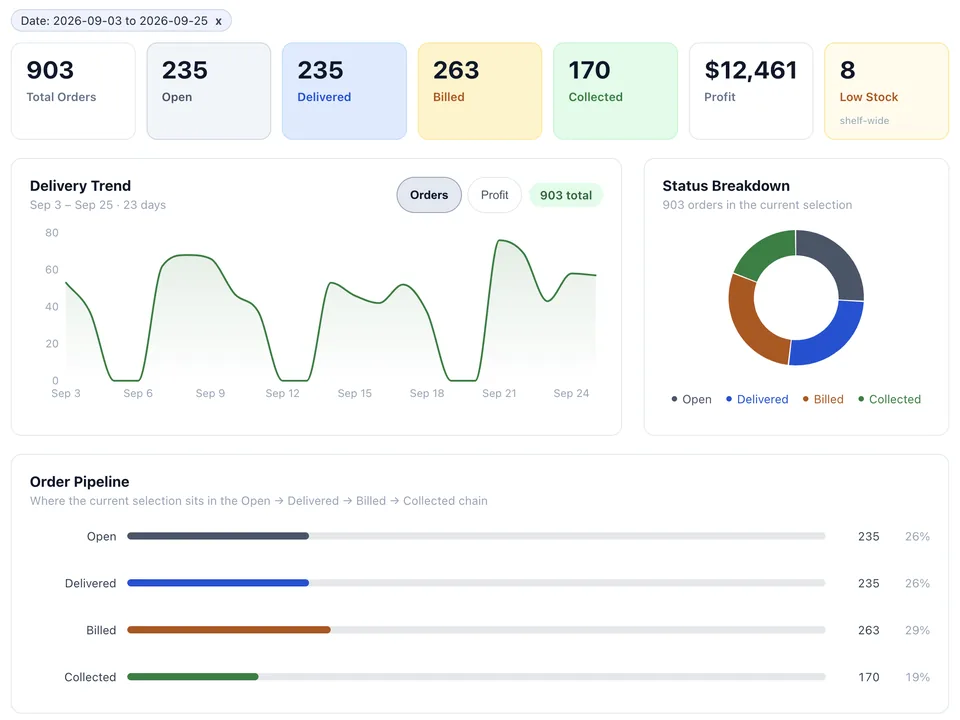
The DME Delivery & Profitability Tracker is software built for independent suppliers. The order is the atomic record: patient, referral source, facility, payer, HCPCS codes, product cost, delivery cost, labor cost, billed, collected. Gross profit, net profit, and margin calculate on entry. Dashboards roll up by payer, doctor, facility, HCPCS, vendor, referral source, and product category. Each order records the equipment's serial number, which lays the groundwork for tracking each unit's capped-rental clock and cost recovery across patients. That tracking is on the roadmap.

It sits alongside Brightree and QuickBooks rather than replacing them; integration with either is on the roadmap. It started as a build for one supplier and is now available to others.

  • Order-level gross and net margin, calculated on entry
  • Roll-ups by payer, referral source, facility, HCPCS, vendor, product
  • Designed for fast, clean entry by office staff or virtual assistants
  • Search, filters, Excel export, role-based access
  • Roadmap: per-serial-number capped-rental tracking across patients
  • Roadmap: Brightree and QuickBooks integration

The first payer-level and referral-source margin view the business had ever had.

Multi-provider OB/GYN practice2026

Profitability by provider, payer, service line, and referral source, with the findings written for you.

A multi-provider practice could see revenue but not margin: which providers, payers, and visit types were carrying the practice and which were quietly costing it. I built a practice intelligence platform that tracks profitability across every dimension of the operation, calculates margin automatically, and includes an AI analyst layer that reads the full dataset and returns severity-rated, dollar-quantified findings.

  • Provider, payer, service line, referral source, visit type
  • Collection rate and payer performance
  • New-patient acquisition channel analytics
  • AI-generated findings, ranked by dollar impact

Smaller builds, same idea

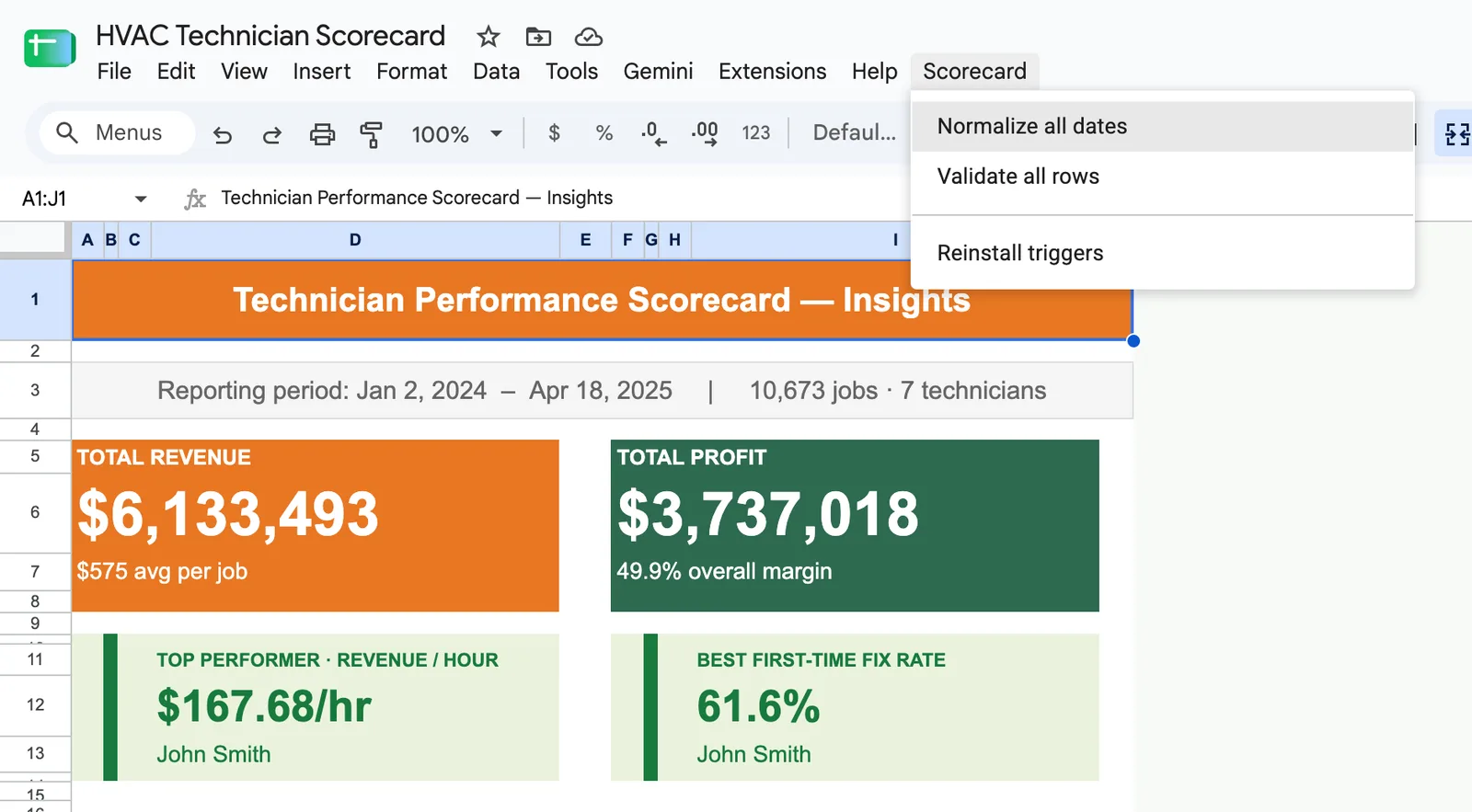
  • HVAC technician scorecard in Google Sheets, demo data: revenue, profit, and margin totals; top performer by revenue per hour; best first-time fix rate; estimated callback losses; and the sheet's custom Scorecard menu.

    HVAC technician scorecards

    Technician revenue contribution, performance trends, and coaching signals in Google Sheets.

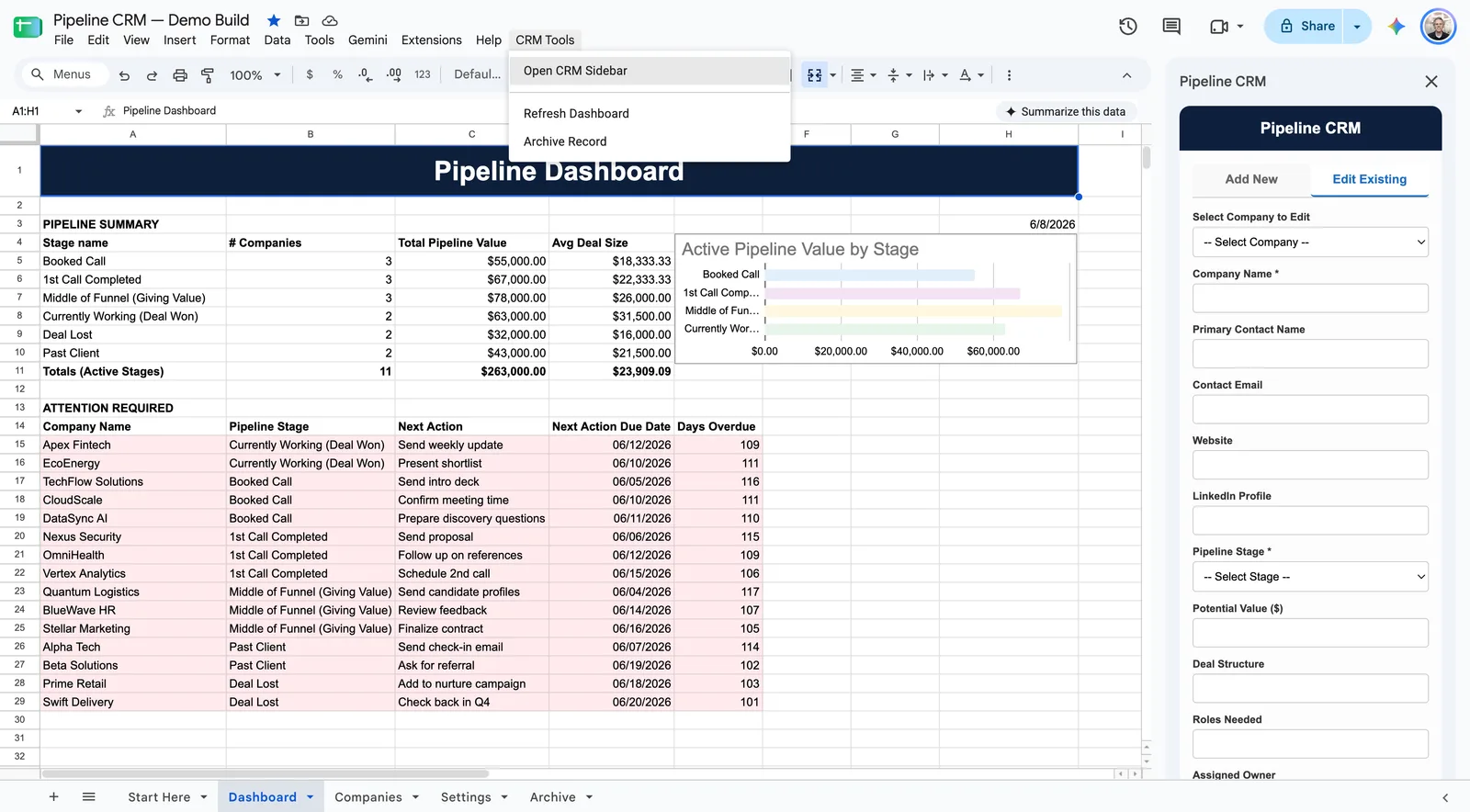
  • Pipeline CRM in Google Sheets, demo data: pipeline summary and value by stage, a list of overdue next actions, the custom CRM Tools menu, and the sidebar form for adding and editing companies.

    Google Sheets CRM and workflow tool

    Contacts, activity, and pipeline tracking inside a familiar spreadsheet.

  • Proposal Drafter

    Calls, notes, and email threads turned into summaries, actions, and follow-ups.

  • Account Analyzer

    Account data in, health score and recommended actions out.

  • PrepFlo

    Prep and staffing workflow app for catering operators.

One person who can do the whole job, from the spreadsheet to the software to the AI workspace

Most operators who need this work end up hiring three people: someone to untangle the spreadsheet, someone to build the database and the app, and someone to make the dashboards mean something. I do all three, which means the data model, the entry screens, and the reports are designed by the same person, for the same economics, from the start.

Diagnosis first

I start with the workflow, not the file. Who enters what, where the numbers come from, and which question the business can't answer. Sometimes the right outcome is a better spreadsheet, and I'll say so.

Proof: the Excel diagnostic and migration plan.

Spreadsheet architecture

Ten-plus years in Excel and Google Sheets: separating inputs from logic, protecting the formulas that matter, validation, VBA and Apps Script automation, and reporting views a second person can read.

Proof: technician scorecards, the Sheets CRM, estimator rebuilds.

Data models built around the economics

The atomic record decides what you can ever measure. For a DME supplier that's the order; for a practice it's the visit. Get that right and every roll-up by payer, referral source, provider, or serial number falls out of it.

Proof: the DME tracker's order model.

Full-stack build and deployment

Node, Express, PostgreSQL, React. Multi-user, role-based, cloud-hosted, with search, filters, and export from day one. Built to sit alongside Brightree, QuickBooks, or whatever you already run, not to replace it on day one.

Proof: the DME tracker, the practice intelligence platform.

AI where it changes the answer

Analyst layers that read the whole dataset and return findings ranked by dollar impact. Summaries of calls and threads that become actions. Scoring that tells you which accounts need attention. No chatbots for the sake of it.

Proof: the practice platform's findings engine, Proposal Drafter, Account Analyzer.

Knowledge architecture

Deciding what should be a canonical document, structured data, software, an AI workflow, or a human call, and setting source authority so an AI workspace knows which of your three pricing sheets is the real one.

Proof: the AI Business Workspace methodology.

Designed for the people entering the data

A system is only as good as its inputs. I design entry for the virtual assistant or office manager who will key two hundred orders a week: fast, validated, hard to get wrong.

Proof: the DME tracker's Phase 1 entry design.
I've spent a decade inside the tools operators use to price work and track money.

Nearly all of them are missing the same thing: the number that says what a given piece of work actually earned. My background is Excel and Google Sheets automation, data analysis, and web application development, and for more than ten years I've used it to help businesses build, repair, and replace the tools they rely on to bid, deliver, and report.

I start every engagement by diagnosing how the business actually runs, not the tool, and I'll tell you plainly whether something should be cleaned up, automated, rebuilt as software, or structured for AI. When it should be built, I design the data model, build the application, deploy it, and stay close while your team starts using it. The DME software on this site started that way, as one supplier's build.

Based in the Dallas–Fort Worth area. Remote projects welcome.

Which of these sounds like your business?